What is an Open Badge?
What an Open Badge really is — a portable, verifiable digital credential. The image, the data model, the 3.0 standard, and how trust actually works.
OPEN BADGE VALIDATOR · Oct 21, 2026
An Open Badge is a digital credential that carries its own proof. On the surface it looks like a small circular image you might post on LinkedIn — but behind that image sits a structured, machine-readable record of who achieved what, issued by whom, under which criteria, and sealed with a cryptographic signature that anyone can check in seconds. That last part is the whole point: an Open Badge does not ask you to trust it. It invites you to verify it.
This guide walks through everything the term covers: where the standard came from, what is actually inside a badge, how the trust model works, and how to tell a real Open Badge from a decorative picture.
The short answer
Open Badges is an open standard for digital credentials, currently maintained by 1EdTech (formerly IMS Global Learning Consortium). "Open" means three concrete things:
- Anyone can issue. A university, a bootcamp, an employer, a conference, a community — no central authority decides who may create badges.
- Anyone can verify. The specification is public, so any independent tool can check any badge without asking the issuer for permission. That is exactly what this site's Open Badge validator does.
- The recipient owns it. A badge belongs to the person who earned it. It can be downloaded, moved between platforms, embedded in a portfolio or stored in a credential wallet — and it stays verifiable everywhere.
Since version 3.0, an Open Badge is technically a W3C Verifiable Credential of type OpenBadgeCredential. That alignment matters: it plugs badges into the much larger ecosystem of digital identity — the same cryptographic machinery used for digital diplomas, professional licenses and government-issued credentials.
Two layers: the image and the data
The most common misunderstanding about Open Badges is to equate the badge with its artwork. The artwork is real and useful — people share images, not JSON — but it is only the visible half of the credential.
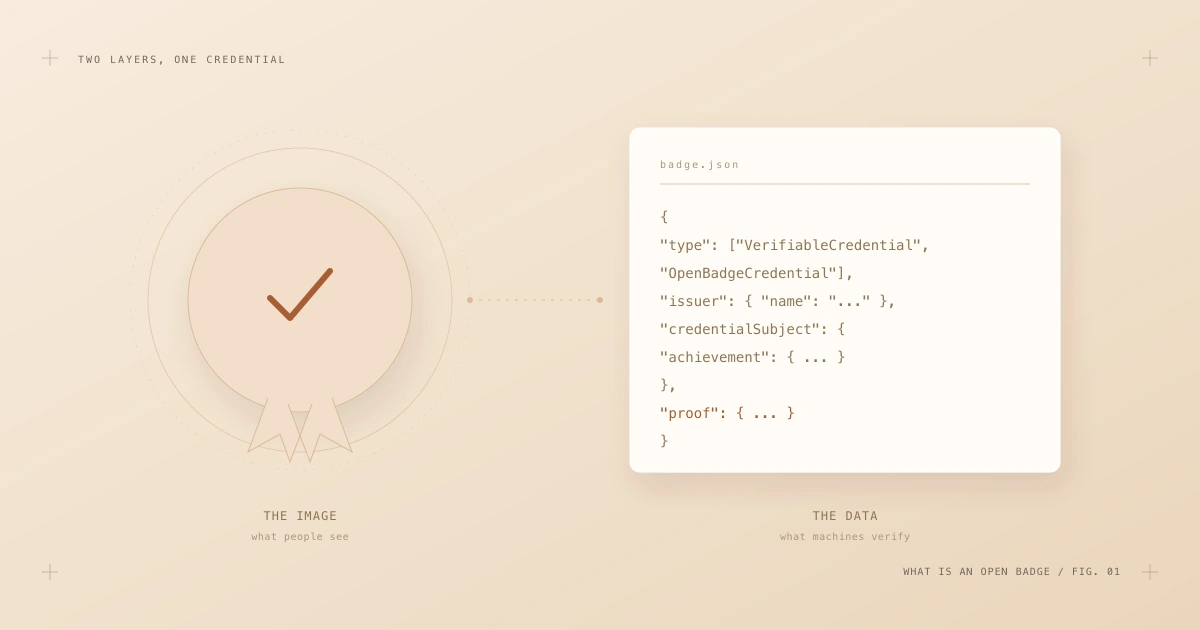
Fig. 1 — The image is for people. The data is for verification. A real Open Badge always has both.
Every genuine Open Badge consists of:
- The image — a PNG or SVG that represents the achievement visually. It is what humans recognize at a glance.
- The data — a JSON-LD document describing the achievement, the recipient, the issuer and the issuing conditions, finished with a digital signature.
The two layers can live together in a single file (a so-called baked badge — more on that below) or the data can live at a stable URL that the image merely points to. Either way, the rule of thumb is simple: if there is no data layer, there is no Open Badge — just a picture. A screenshot of a badge proves nothing, because the pixels carry no verifiable information. Only the underlying credential can pass verification.
A quick history: from a Mozilla project to Open Badges 3.0
Open Badges did not appear overnight. The idea has been refined continuously for more than a decade, and knowing the versions helps you understand what you are looking at in the wild.
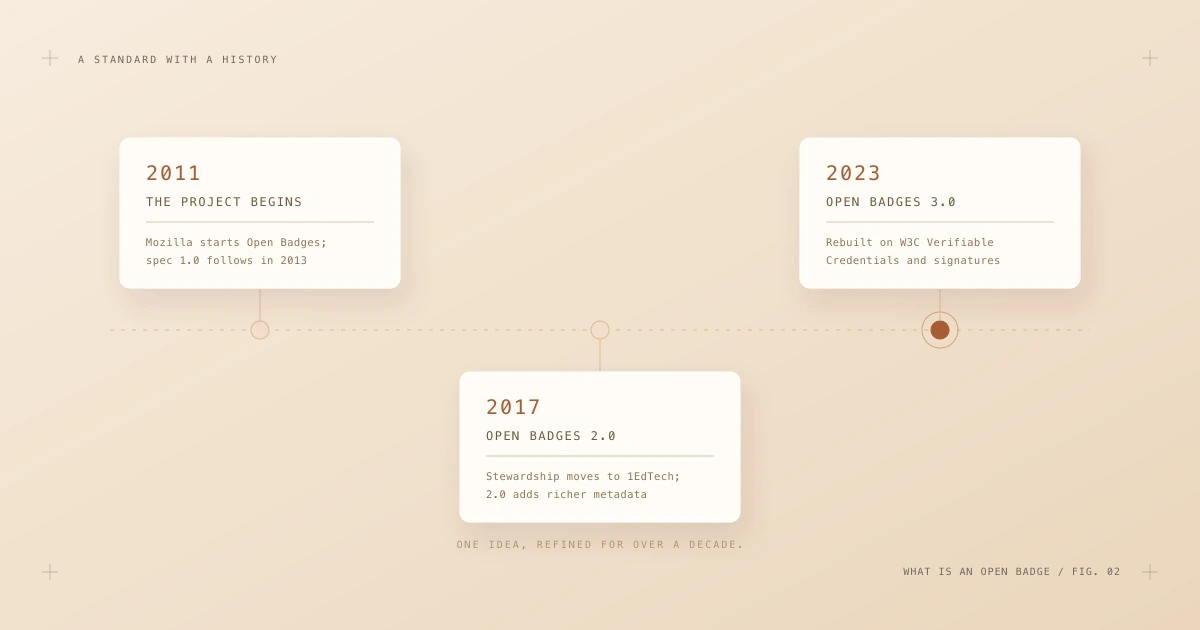
Fig. 2 — One idea, three major generations: Mozilla's original project, 1EdTech's 2.0, and today's Verifiable-Credentials-based 3.0.
- 2011–2013 — the origin. Mozilla, backed by the MacArthur Foundation, launched the Open Badges project to make learning that happens outside classrooms visible and portable. Version 1.0 of the specification shipped in 2013.
- 2017–2018 — Open Badges 2.0. Stewardship moved to IMS Global (today's 1EdTech). Version 2.0 added richer metadata: endorsements, evidence, alignment with skill frameworks and clearer verification rules. Many badges in circulation today are still 2.0.
- 2023 — Open Badges 3.0. The standard was rebuilt on top of the W3C Verifiable Credentials Data Model. Badges gained modern cryptographic proofs, selective disclosure possibilities, wallet compatibility and a status mechanism for revocation. This is the version our validator focuses on, and the version every new program should issue.
The jump from 2.0 to 3.0 is bigger than the version number suggests. In 2.0, verification usually meant "fetch a URL from the issuer's server and see if it still says what the badge says." In 3.0, the credential carries a signature that can be verified mathematically — even offline, even if the issuer's website is temporarily down, even decades later. Trust no longer depends on a hosted endpoint answering politely; it depends on cryptography.
Who does what: issuer, recipient, verifier
Every Open Badge lives inside a triangle of three roles. Understanding the triangle explains almost every design decision in the standard.
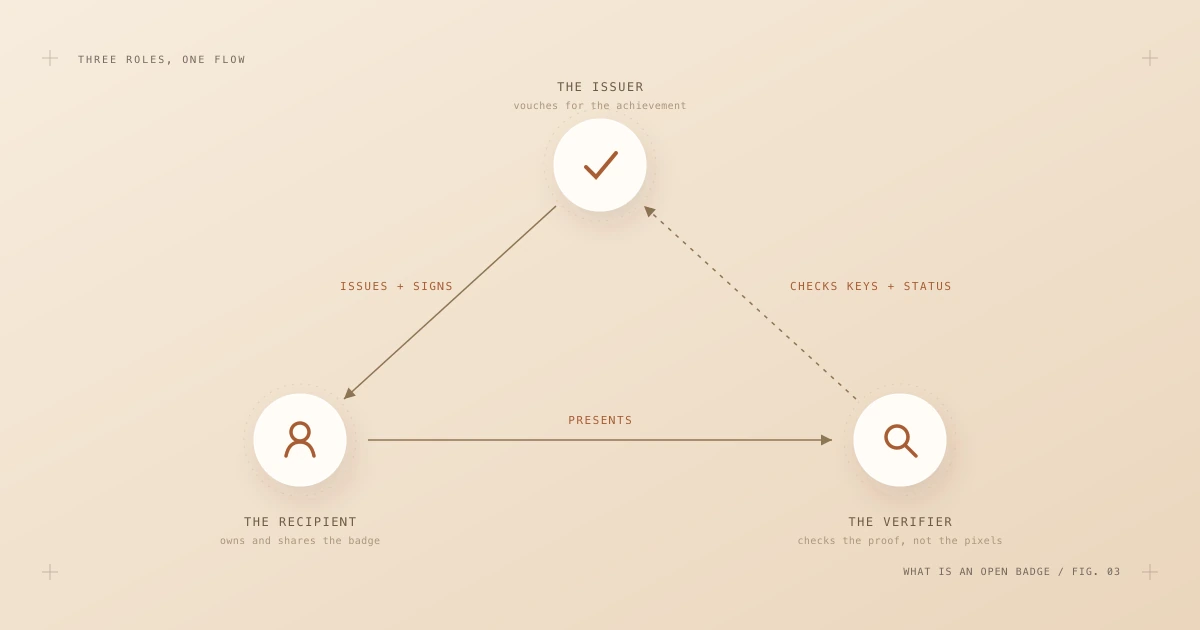
Fig. 3 — The issuer signs, the recipient presents, the verifier checks — without ever having to ask the issuer for permission.
- The issuer defines the achievement, decides who earned it, and signs the credential with a private key. The matching public key is published at a stable URL in the issuer's profile. Issuing well is its own craft — we cover it in depth in How to issue Open Badges people can trust.
- The recipient receives the signed credential and owns it outright. They can share it anywhere: a baked image in an email signature, a link on a CV, an entry in a verifiable-credentials wallet. The badge is not locked to the platform that issued it.
- The verifier — a recruiter, a registrar, an admissions officer, software — takes the credential and checks it independently: the structure against the official schema, the signature against the issuer's published key, the status against the issuer's revocation list. No account, no phone call, no email to the issuer required.
Notice what is absent from this triangle: a central registry. There is no global database of all badges, by design. The system is decentralized, which is why independent verification tools matter so much — they are how the open ecosystem keeps itself honest. You can read about how this site performs each check on the how it works page.
What's inside the credential
Strip away the artwork and an Open Badge 3.0 credential is a surprisingly readable JSON-LD document. These are the fields that do the heavy lifting:
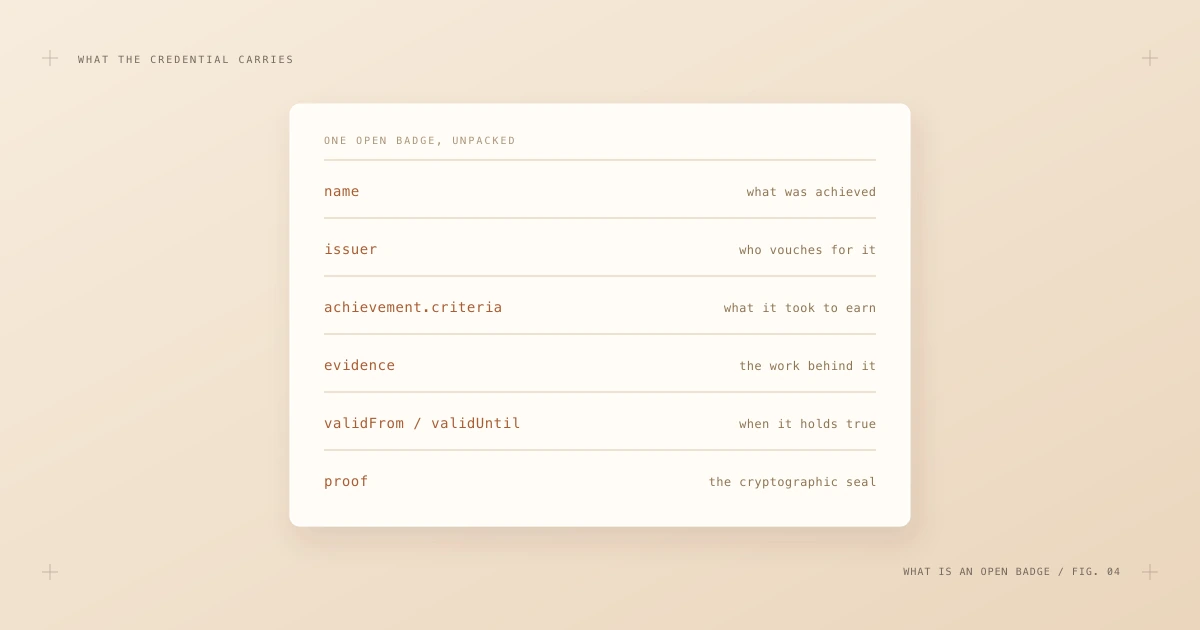
Fig. 4 — Six field groups carry the meaning: what, who, how, proof of work, time window, and the cryptographic seal.
A minimal (abbreviated) example looks like this:
{
  "@context": [
    "https://www.w3.org/ns/credentials/v2",
    "https://purl.imsglobal.org/spec/ob/v3p0/context-3.0.3.json"
  ],
  "type": ["VerifiableCredential", "OpenBadgeCredential"],
  "issuer": {
    "id": "https://badges.example.edu/issuer.json",
    "type": ["Profile"],
    "name": "Example University"
  },
  "validFrom": "2026-09-01T00:00:00Z",
  "name": "Data Analysis Fundamentals",
  "credentialSubject": {
    "type": ["AchievementSubject"],
    "achievement": {
      "id": "https://badges.example.edu/achievements/data-analysis",
      "type": ["Achievement"],
      "name": "Data Analysis Fundamentals",
      "description": "Core data analysis skills, demonstrated in practice.",
      "criteria": {
        "narrative": "Complete all six modules and ship a final project."
      }
    }
  },
  "proof": { "type": "DataIntegrityProof", "...": "..." }
}
A few of these fields deserve a closer look:
achievement.criteriastates what it took to earn the badge. This is what separates a meaningful credential from a participation sticker. Good criteria are specific, public and stable.evidence(optional, but powerful) links to the actual work: a project repository, an assessed submission, an exam record. Evidence turns "trust me" into "see for yourself."validFrom/validUntildefine the window in which the credential holds. Skills expire; good credentials can too.proofis the digital signature. It covers the entire document, so changing even a single character — a name, a date, a grade — breaks the proof and the badge fails verification instantly.
Baked badges: credentials that travel
One of the most elegant ideas in the standard is baking: embedding the complete, signed credential inside the badge image file itself. A baked PNG carries the JSON in a metadata chunk; a baked SVG carries it in a dedicated element.
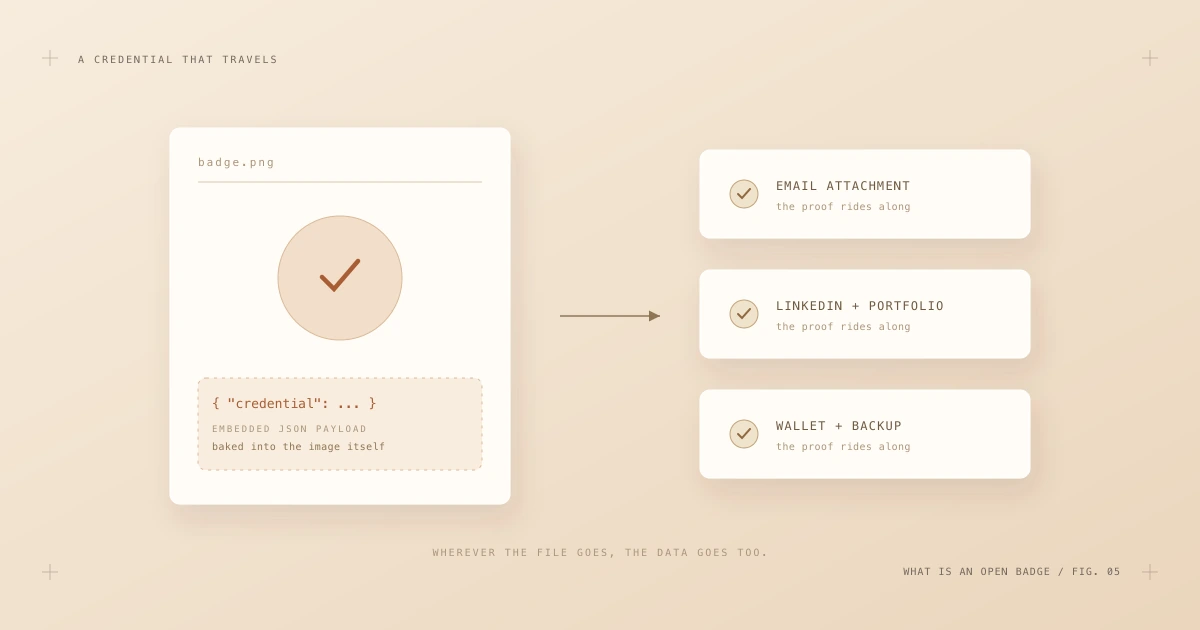
Fig. 5 — A baked badge carries its credential wherever the file goes: email, social profiles, portfolios, wallets.
The consequence is delightful: the file is the credential. A recipient can attach the badge image to an email, upload it to a portfolio or keep it in a backup folder for ten years — and anyone who receives that exact file can drop it into a validator and verify it on the spot. No link rot, no dependence on the issuing platform still existing.
One caution: baking survives copying a file, but not re-encoding it. If a social platform compresses or converts the image, the embedded payload is stripped — the picture survives, the credential does not. That is why serious recipients keep the original file (or the credential URL) alongside the pretty version they post.
Open Badges vs. PDFs and paper
Why go through all this instead of simply mailing out PDF certificates? Because the two formats fail in exactly the places the other succeeds.
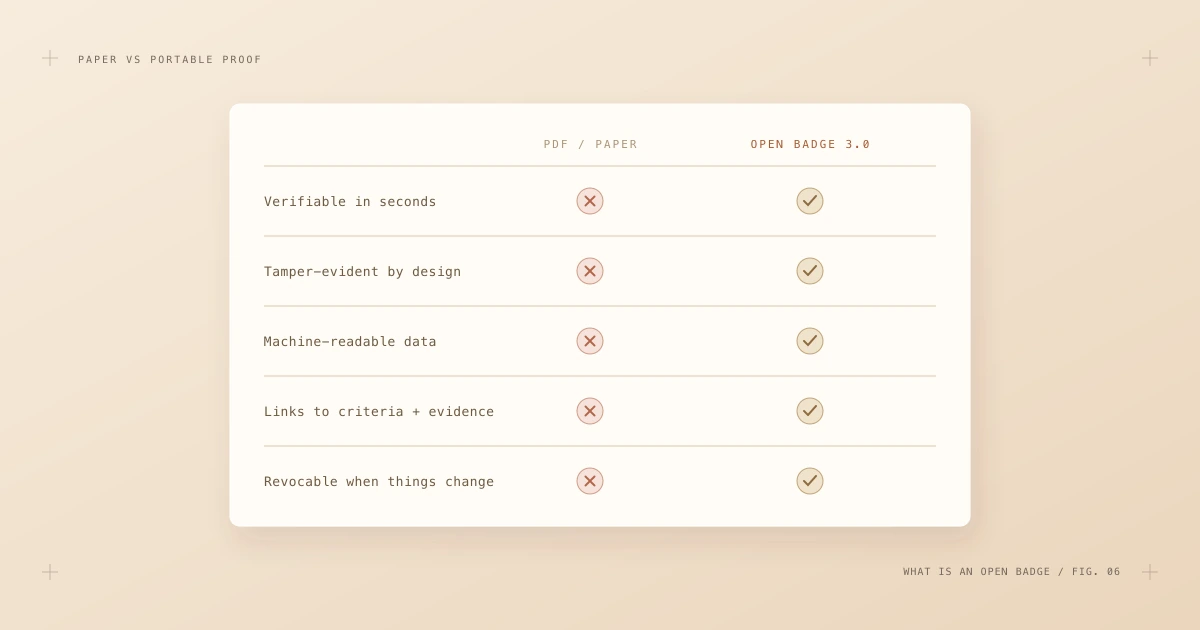
Fig. 6 — A PDF asserts; an Open Badge proves. The difference shows up the moment someone actually checks.
- Verification speed. Confirming a paper certificate means calling or emailing the institution and waiting. Verifying an Open Badge takes seconds and zero human effort on the issuer's side.
- Tamper evidence. A PDF can be edited with free tools in minutes, and the forgery is often undetectable. An Open Badge that has been altered by a single byte fails its proof check — loudly.
- Machine readability. HR systems, talent marketplaces and learning platforms can parse a badge's skills and criteria automatically. A scanned certificate is a photograph of information, not information.
- Lifecycle management. Certificates, once printed, are forever — even when they shouldn't be. Open Badges support status and revocation, so a credential that no longer holds can be marked as such without chasing down every copy.
None of this makes paper worthless — ceremony has value. But when the question is "can I rely on this claim?", only one of the two formats can answer by itself.
Where you'll meet Open Badges
The standard was born in education, but it has long outgrown it. Today you will find Open Badges issued for:
- Course and program completion — universities, MOOCs, bootcamps and training providers issuing completion and competency credentials.
- Professional certification — associations and awarding bodies issuing exam-based certifications with expiry dates and recertification cycles.
- Workplace skills — employers recognizing internal training, mentorship, and demonstrated on-the-job capabilities.
- Community contribution — open-source projects, volunteer organizations and conferences acknowledging real contributions.
- Micro-credentials — the fast-growing middle ground between a single course and a full degree, where stackable, verifiable units of learning matter.
Most issuers do not build this infrastructure by hand. Dedicated credentialing platforms such as Certifier handle the data model, the signing, the hosting and the delivery, so an academy or training team can design a badge and issue a thousand of them without touching JSON — while the result remains a standards-compliant credential that any independent tool can verify.
How to tell a real Open Badge from a pretty picture
With the theory in place, the practical test is short. When someone shows you a badge, ask three questions:
- Is there a credential behind the image? Ask for the original baked file or the badge URL. If all that exists is a JPEG screenshot, there is nothing to verify.
- Does it verify independently? Run the file or URL through a neutral Open Badge validator — one that is not operated by the issuer. A genuine badge passes structure, proof and status checks in seconds; the full process is described step by step in How to verify an Open Badge.
- Do the criteria mean anything? Verification proves authenticity, not value. Read the achievement's criteria and evidence. "Attended a webinar" and "built and defended a working project" can both be valid badges — they are not equally meaningful ones.
That ten-second habit — ask for the original, verify it, read the criteria — is all it takes to participate in the trust model the standard was designed around.
Where to go next
An Open Badge, then, is three things at once: an image people can share, a data record machines can read, and a cryptographic proof anyone can check. The 3.0 standard ties them together into a credential that is portable, durable and independently verifiable — which is exactly what a claim about human skill should be.
If you want to keep going:
- Learn the verification process in detail: How to verify an Open Badge.
- Planning to issue? Start with How to issue Open Badges people can trust.
- Already running a program? See Managing an Open Badge program at scale.
- Or simply grab a badge you have received and verify it right now — the best way to understand the standard is to watch it work.