How to verify an Open Badge
Learn how to check an Open Badge 3.0 credential — from the original file or URL to a readable report of structure, proof and status checks.
OPEN BADGE VALIDATOR · Oct 20, 2026
Verifying an Open Badge means checking the credential behind the image: its structure, its cryptographic proof and its current status. Upload the original badge file or paste its public URL into the validator and read the full report — every passed, failed and skipped check — before deciding what the badge is worth.
That is the one-paragraph version. This article is the long version: what each check actually does, why the order matters, what a healthy report looks like, and which red flags should make you slow down. Whether you review one badge a month as a recruiter or thousands a semester as a registrar, the process is the same — and it takes less time than reading this sentence took.
What "verifying" actually means
First, a distinction that saves a lot of confusion. When people say they "checked" a badge, they usually mean one of three very different things:
- Looking at it. The image seems professional, the logo looks familiar. This is worth nothing — anyone can draw a convincing badge in Canva in four minutes.
- Trusting the platform. The badge sits on a well-known credentialing site, so it is probably fine. Better, but you are trusting a brand, not checking a credential.
- Verifying it. Taking the credential data and independently confirming that it is well-formed, that its signature matches the issuer's published key, and that the issuer has not revoked it. This is the only option that produces evidence instead of vibes.
Open Badges — as explained in What is an Open Badge? — were designed precisely so the third option is available to everyone. Since version 3.0, every badge is a W3C Verifiable Credential with a cryptographic proof, which means verification is pure math plus a couple of HTTP requests. You never need the issuer's cooperation, an account, or anyone's permission.
The verification pipeline at a glance
Every serious verification tool, including ours, runs some version of the same pipeline:
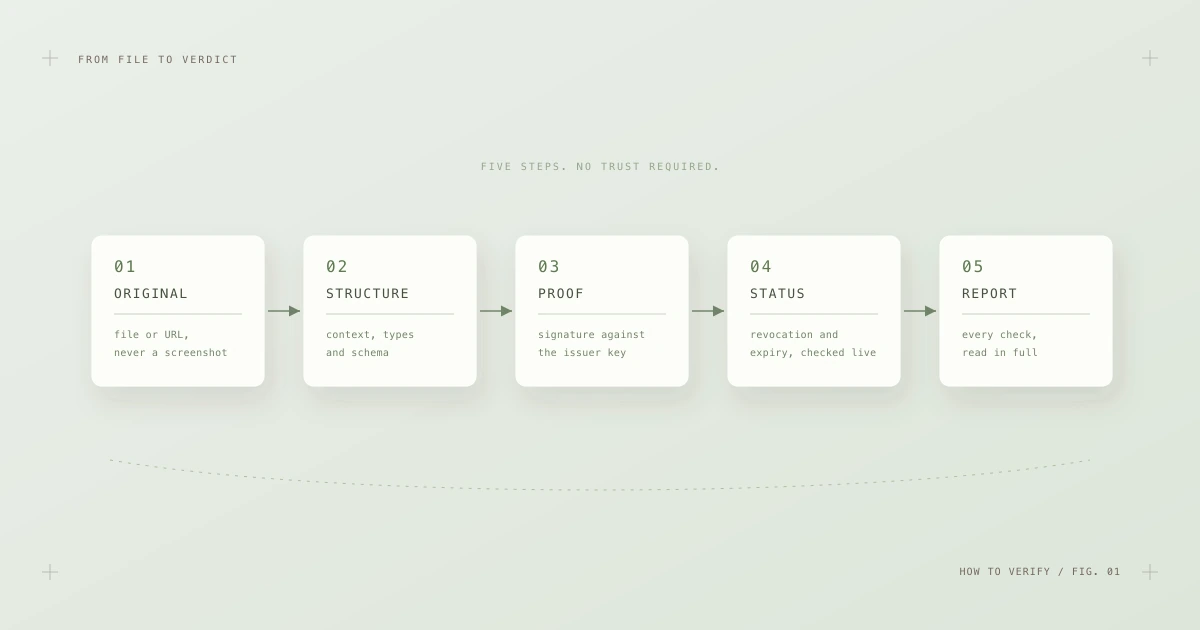
Fig. 1 — Five steps, in a fixed order: original → structure → proof → status → report. Each step only makes sense after the previous one.
The order is not cosmetic. There is no point checking a signature on a document that is not a credential at all, and no point checking revocation status for a credential whose signature already failed. Good tools run the steps in sequence and report every step separately — which is what makes the final report readable.
Let's walk through them one by one.
Step 1: Get the original credential
Verification operates on data, so step zero is obtaining the actual credential — not a picture of it.
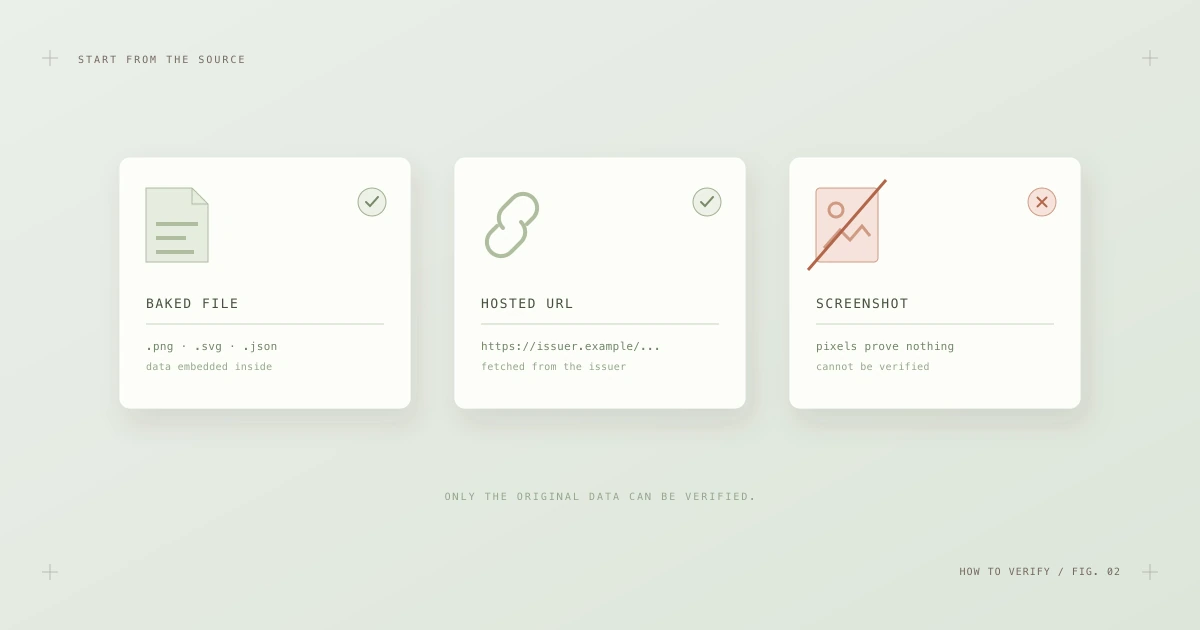
Fig. 2 — Two good sources and one dead end. Pixels cannot be verified; only the original data can.
You are looking for one of these:
- A baked badge file — the original
.pngor.svgthe recipient was given, with the signed credential embedded inside, or a raw.jsoncredential file. - A credential URL — a public link (usually from the issuer's platform) that serves the credential data directly.
What does not work: screenshots, re-exported images, photos of a laptop screen, or images that passed through a messenger or social network that re-compresses uploads. Re-encoding strips the embedded payload — the picture survives, the credential does not. If a candidate can only produce a screenshot, that is not automatically fraud; most people simply don't know the difference. Ask for the original file or the share link from the issuing platform. Recipients of badges issued through platforms like Certifier always have a hosted credential URL they can share, and most other platforms work the same way.
Once you have the file or URL, drop it into the validator. Everything after this point is automatic — but it is worth understanding what happens next, so you can read the results with confidence.
Step 2: Check the structure
The first automated stage confirms that the document is, structurally, an Open Badge 3.0 credential:
- The JSON parses and the
@contextdeclarations resolve — these bind the document's vocabulary to the official W3C and 1EdTech definitions. - The
typearray containsVerifiableCredentialandOpenBadgeCredential. - The document validates against the official JSON schema: required fields present, correct shapes, correct datatypes.
A well-formed credential contains, at minimum, an identifiable issuer, a subject with an achievement, a validity date and a proof:
{
  "type": ["VerifiableCredential", "OpenBadgeCredential"],
  "issuer": { "id": "https://badges.example.edu/issuer.json", "...": "..." },
  "validFrom": "2026-09-01T00:00:00Z",
  "credentialSubject": {
    "achievement": { "name": "...", "criteria": { "...": "..." } }
  },
  "proof": { "type": "DataIntegrityProof", "...": "..." }
}
Structural failures are common and usually boring: a hand-rolled issuing script that misspelled a field, a context URL that no longer resolves, a 2.0 badge presented as 3.0. Boring or not, a credential that fails structure cannot proceed — nothing downstream is trustworthy if the document itself is malformed.
Step 3: Check the cryptographic proof
This is the heart of verification — the step that separates Open Badges from every "digital certificate" that is really just a styled PDF.
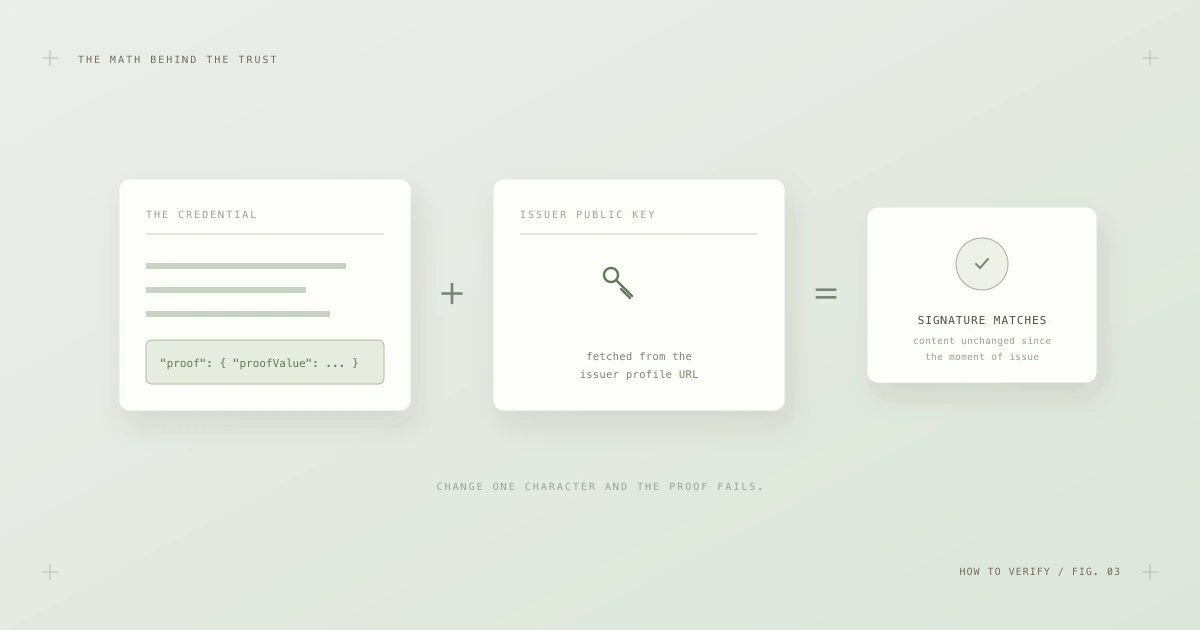
Fig. 3 — The credential, plus the issuer's published public key, either produces a mathematical match — or it doesn't.
When the issuer created the badge, they signed it with a private key only they hold. The matching public key is published at a stable URL inside the issuer's profile. The verifier:
- Reads the
proofblock (or unwraps the JWT envelope, depending on how the badge was signed). - Fetches the issuer's public key from the URL referenced by the credential.
- Recomputes the signature math over the credential's contents.
If anything in the credential changed since signing — a name, a date, a grade, a single character — the math no longer matches and the check fails. There is no "almost valid". This is also why a passed proof check carries so much weight: it proves both authenticity (signed by the holder of the issuer's key) and integrity (unchanged since issue) in one stroke.
One nuance worth knowing: the proof ties the credential to a key, and the key to a URL. Confirming that the URL genuinely belongs to the organization it claims to represent — that badges.example.edu is really Example University — is the verifier's judgment call. A signature from an unknown issuer is still a valid signature. Verification tells you the credential is intact; you decide whether the issuer deserves trust.
Step 4: Check status and expiry
A badge that was perfectly valid when issued can stop being valid later. Certifications expire. Credentials get issued by mistake. Occasionally one is revoked for cause. This is what the status step catches.
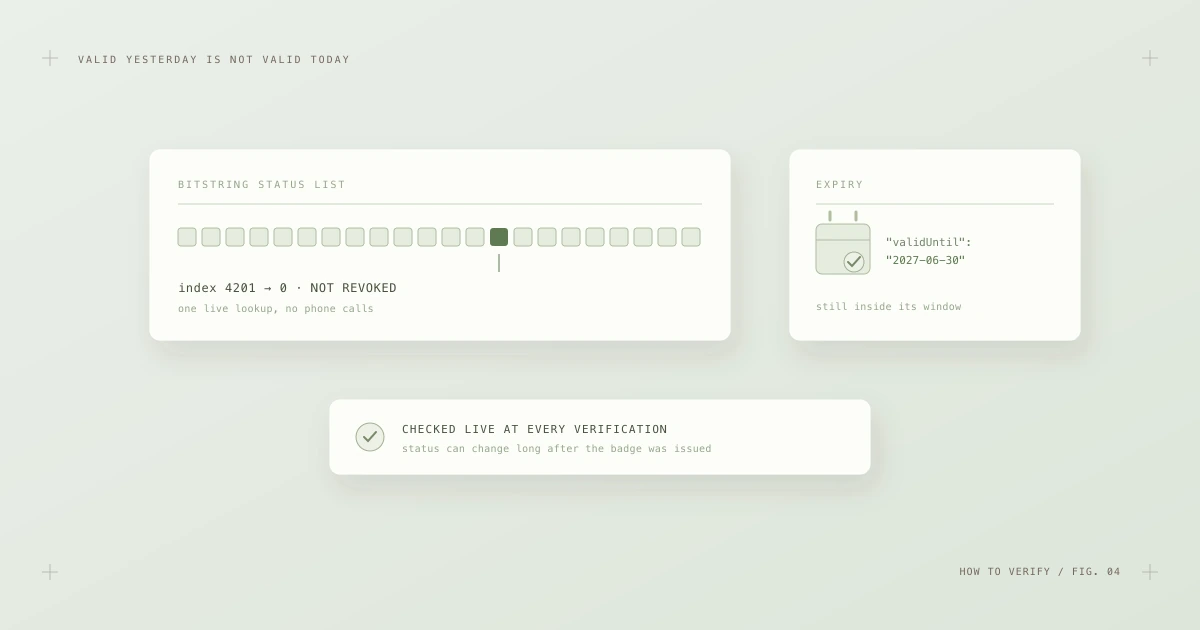
Fig. 4 — Status is checked live: one lookup in the issuer's status list, plus a comparison against the credential's validity window.
Two separate questions are answered here:
- Has the issuer revoked it? Modern credentials reference a status list — essentially a long, hosted bitstring where each issued credential owns one position. The verifier fetches the list and reads a single bit:
0means active,1means revoked. The lookup is anonymous and instant; the issuer never learns which credential was checked. - Is it inside its validity window? If the credential carries
validFrom/validUntildates, the verifier compares them against the clock. An expired first-aid certification should fail this check — that is the system working, not failing.
Status is the reason verification should happen at the moment you rely on the badge, not once and forever. A report from last quarter says nothing about today. This is also the step that most often degrades as badge programs age — status list URLs move, hosting lapses — which is why issuers need the maintenance habits described in Managing an Open Badge program at scale.
Step 5: Read the whole report
A good validator does not hand you a green checkmark and a pat on the head. It hands you a report — one line per check, each marked passed, failed or skipped.
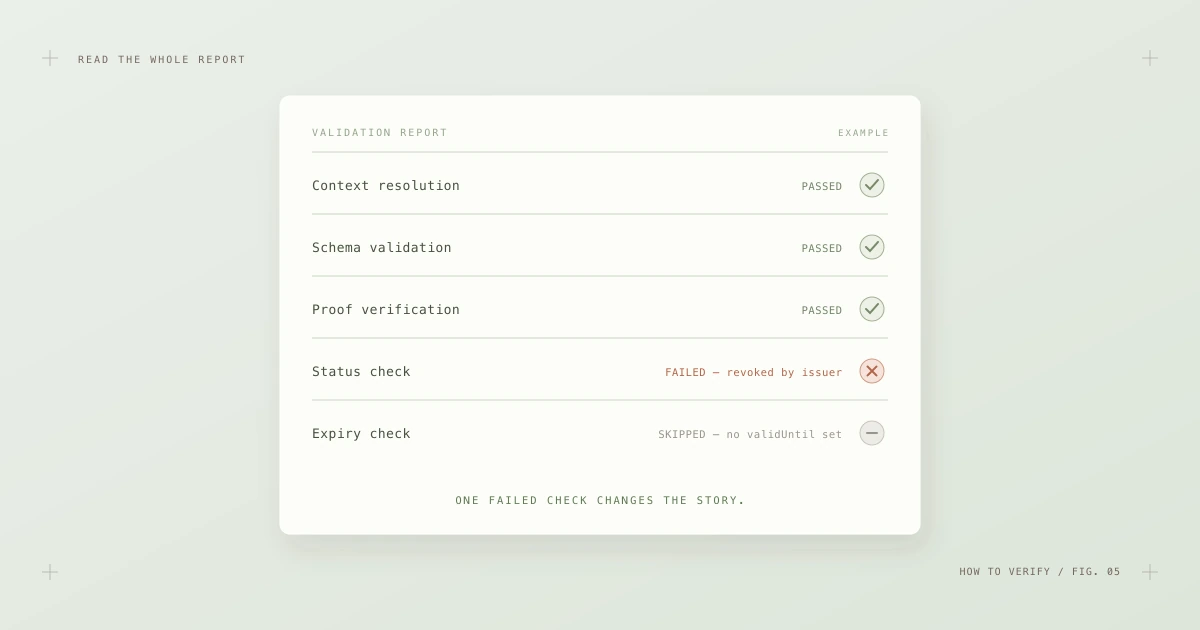
Fig. 5 — A real report from the wild: structure and proof fine, status failed. One line changes the whole story.
Reading one takes ten seconds once you know what to look for:
- All passed — the credential is structurally valid, cryptographically intact, unrevoked and in date. You can rely on its authenticity and move on to judging its meaning.
- A failed structure check — usually issuer sloppiness rather than fraud, but the credential cannot be relied upon either way.
- A failed proof check — the serious one. The credential was modified after signing, or the signature does not match the published key. Treat with real suspicion.
- A failed status check — the badge was genuine but is now revoked or expired. The interesting question becomes why, and it is a fair one to ask the candidate or the issuer.
- Skipped checks — not failures. A skipped expiry check on a credential with no
validUntilsimply means there was nothing to test. Skips are honesty in reporting: the tool telling you what it couldn't conclude rather than pretending.
The habit that matters: never compress the report back into a single color in your head. The pattern of results is the information.
Red flags worth slowing down for
Most verification failures are mundane. But a few patterns deserve extra attention:
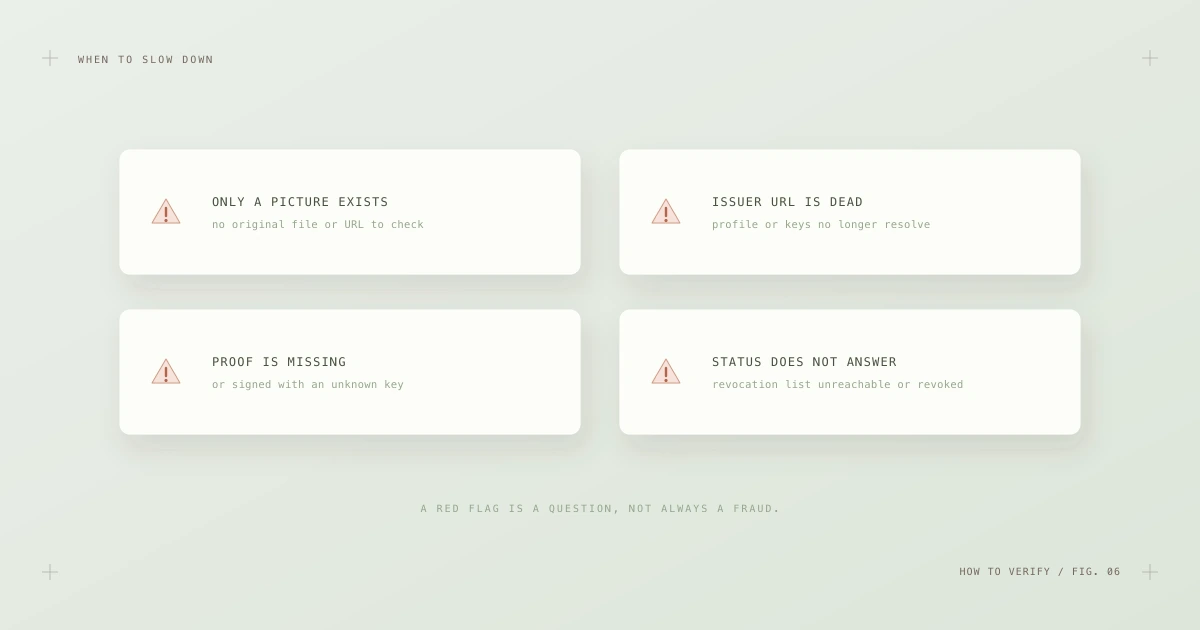
Fig. 6 — Four situations that justify a closer look. A red flag is a question to ask, not automatically a fraud to report.
- Only a picture exists. The claimant cannot produce a baked file or a credential URL from any issuing platform. Perhaps innocent; always unverifiable.
- The issuer's URLs are dead. Profile or key URLs that no longer resolve make the proof unverifiable. Common with abandoned badge programs — and indistinguishable, from the outside, from a fabricated issuer.
- The proof is missing or odd. No
proofblock on a document claiming to be 3.0, or a signature that fails against the published key. The latter is the closest thing this ecosystem has to a smoking gun. - Status does not answer. A referenced status list that is unreachable leaves you unable to rule out revocation. Weigh the stakes of your decision accordingly.
In each case, the right move is the same: ask for the original credential, re-run the check, and if it still fails, ask the issuer directly. Fraud exists, but entropy is far more common — and the polite assumption is entropy until the evidence says otherwise.
A note on older badges
You will still meet Open Badges 2.0 credentials in the wild — millions were issued and many remain meaningful. Their verification model is weaker: 2.0 badges are typically hosted, meaning verification is "fetch the assertion from the issuer's server and compare." There is no signature to check in the usual case, so if the issuer's server is gone, so is all verifiability. Treat a 2.0 badge from a live, reputable issuer as reasonable evidence; treat an unresolvable one as a historical artifact. And if you are the issuer, that asymmetry is the single best argument for issuing 3.0 credentials going forward.
The one-minute workflow
For busy reviewers, the whole discipline compresses into four moves:
- Ask for the original — the baked file or the credential URL, never the screenshot.
- Run it through an independent Open Badge validator. No account needed; nothing is stored.
- Scan the report — all passed? Any fail on proof or status? Any skips that matter for your decision?
- Judge the meaning — read the achievement's criteria and evidence, and decide what the verified claim is worth for your context.
Verification answers "is this credential genuine, intact and current?" with mathematical confidence. The remaining question — "does this achievement matter?" — is yours alone, and it deserves the thirty seconds the machine just saved you.